
CAFÉ
Café
Discover people here over coffee.
 socializer
SAME VENUE · SAME MOMENT · A REAL HELLO
You're out and open to meeting someone, but the first move feels awkward? Socializer shows you who's checked in at the same café, bar or event right now.
WELCOME TO SOCIALIZER
The app shows real venues around you. Check in at one and discover people there, right now, in the same mode as you.
01 / HOW IT WORKS
No endless profiles, no days of texting. It all starts at the venue you're in.
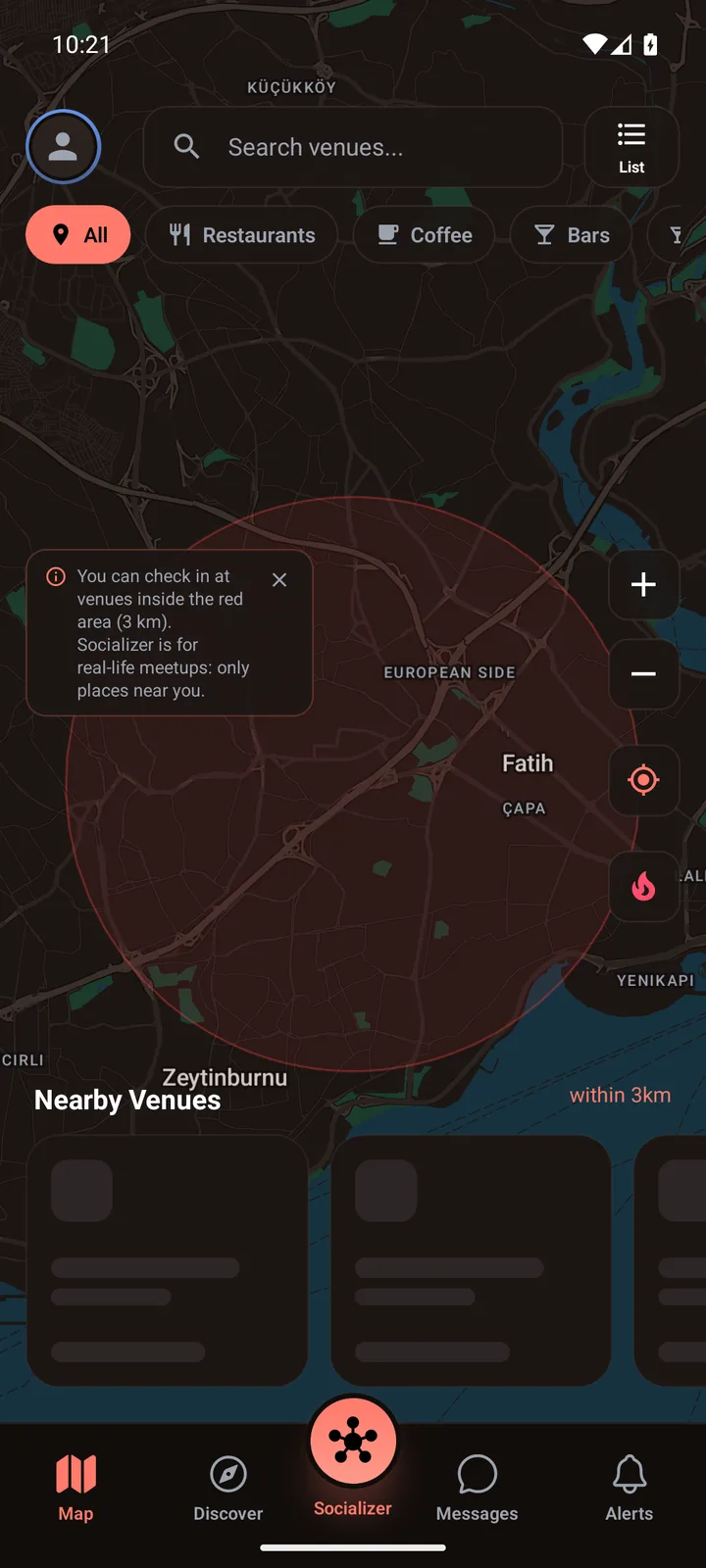
A café, a bar, an event.
The map shows real venues around you and how many people are at each. You can only check in at venues within 3 km — the same rule for everyone, Premium included.
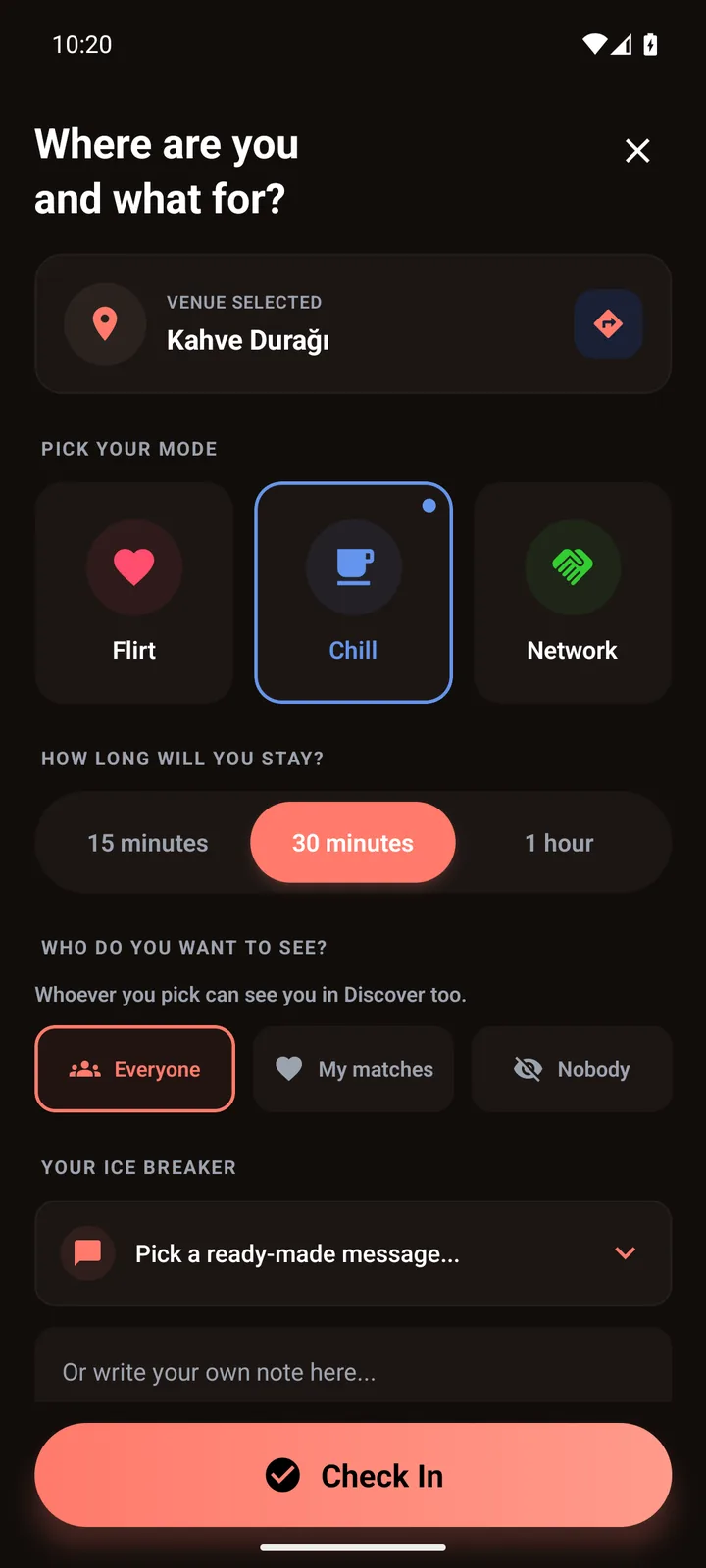
Pick your mode, your stay and who you see.
Flirt, Chill or Network. Stay 15, 30 or 60 minutes, or 2 hours with Premium. You choose your visibility at every check-in.
 AhmetCHECKED IN
Same venue, same mode, same moment.
Discover shows people who checked in at this venue right now and are in the same mode as you; with Premium you can see every mode at the venue, though eye contact still only goes to people in your mode. You also choose who can see you.
♥IT'S A MATCH!
Ayşe ♥ AhmetHey! I'm at the table on the right 👋
I see you 😊 I'll come say hello.
If they accept, a chat opens.
They get a “WINKED AT YOU!” alert and have about a minute to accept. If they do, you match and a short, timed chat opens.

Short chat, real hello.
The chat is short on purpose — just enough to say where you're sitting. Then put the phone down and say hello in person.
01–02 are app screens; details may differ in the current version. Ayşe and Ahmet are fictional; 03–04 are adapted from the app flow. Image 05 is AI-generated.
02 / CHOOSE YOUR MODE
Pick your mode when you check in so people at your venue know your intent.
Choose a mode to explore how the moment feels.
SOCIALIZER / ILLUSTRATIVE MOMENT · SAME VENUE✳Ayşe and Ahmet are at the same café. Both chose Flirt and are open to meeting.
CaféAyşe and Ahmet are at the same venue. Chill makes their wish for an easy hello clear.
CaféAt a coworking space, a shared interest could turn into a conversation in Network mode.
Coworking space03 / THE MOMENT
The chat that opens when you match is short and timed on purpose: just enough to introduce yourself and say where you're sitting. The real introduction happens off the screen, at the same venue.
At every check-in you choose who you see and who can see you. Pick Nobody and nobody sees you.
The person you're chatting with checked in at the same venue — most likely a few tables away, not miles.
04 / A SENSE OF PLACE
Over coffee, on a night out, or during a work break. Socializer makes it easier to meet people at the same place.
Discover people here over coffee.

Meet someone new on a night out.

Start a conversation on a work break.
The venue names and images are fictional illustrations of the experience. The app shows real venues around you.
05 / MEET SAFELY
You decide who sees you and who you talk to.
Socializer is for ages 18 and over. Your profile shows the nickname you choose, not your real name.
No one can message you out of nowhere. A chat only opens when eye contact is accepted. Sending messages requires a profile verified with a selfie; approval can take a while, so verify before you head out.
At every check-in, pick Everyone, My matches or Nobody. Pick Nobody and you won't see anyone in Discover, and nobody will see you.
Uploaded photos go through moderation. You verify your profile with a selfie; once it's approved, your profile shows a verified badge.
Use the menu on someone's Discover card or in the chat to block or report them. Either way, you won't see each other anywhere anymore; reports go to our moderation team.
You can only check in at venues within 3 km. Socializer is for meeting at the same venue, not from afar.
THE SOCIALIZER IDEA
The same place, the same moment, a similar intent. Socializer is designed to bring introductions beyond the screen.
HERE, RIGHT NOWGOOD TO KNOW
Yes, the basics will be free when it launches: check-in, discovery, eye contact and chat will all be on the free plan. Premium will be a separate, optional membership, and you'll also be able to earn it by inviting friends.
Socializer is coming to iOS and Android. We're in closed testing right now. Join the early access list and you'll be the first to know when we launch.
Right now Socializer is only available in Türkiye; phone verification only works with Turkish (+90) numbers. The map shows real venues around you; to meet someone, other people need to be at the same venue too. The more people at a venue, the better, so bring your friends.
Anyone in Türkiye who is 18 or older. At sign-up we ask for your date of birth and you accept the Terms of Use; phone verification only works with Turkish (+90) numbers. Under-18s can't create an account.
No. You can only check in at venues within 3 km of you, Premium included. Socializer is for meeting at the same venue, not from afar.
The map shows venues, not people: you can see how many people are at a venue (only people whose visibility is set to Everyone are counted), not who. Your location is only used while the app is open. It goes to our server to find venues nearby, but it isn't stored with your account. When you check in, your position at that moment is written to the check-in record for the 3 km rule and deleted after 30 days; until then it may be used to notify you about busy venues nearby and announcements for your area. Details are in the Privacy Policy. Others only see you on the Discover screen of the venue you checked in at, according to the visibility you chose.
No. At every check-in you pick Everyone, My matches or Nobody. Your choice works both ways: pick Nobody and you won't see anyone, and nobody will see you. With Premium's Incognito you can see everyone while hidden in Discover; only people you send eye contact to can see you. You can also hide your online status with the “Show my online status” switch in Security & Privacy.
Send eye contact to someone at the same venue. They have about a minute to accept. If they do, you match and move to a chat; if not, no chat opens — that's all. Sending messages requires a profile verified with a selfie; approval can take a while, so verify before you head out. The free plan gives you 5 eye contacts per check-in; Premium is unlimited.
Because the goal is meeting, not texting. A few messages are enough to introduce yourself and say where you are; the rest happens face to face. Premium makes the chat longer — longest when you're both Premium — and Premium members can extend it. When the match ends, messages are deleted automatically after 24 hours; if there's an open report, they're kept until the review ends, for up to 180 days.
It happens, especially early on. Check the map before you go: venue cards show how many people have checked in (people whose visibility is set to Everyone). People who arrive after you will appear in Discover as well. To switch venues, cancel your check-in; on the free plan you wait 15 minutes before checking in somewhere else.
Block or report them from the menu on their Discover card or in the chat header; incoming eye contact and the Who Looked At You list also have a “Block or report” option. Either way, you won't see each other anywhere anymore. Reports go to our moderation team for review, and you can lift a block any time in Security & Privacy › Blocked people. You can end your check-in at any time. If you don't feel safe, ask venue staff for help; in an emergency call 112.
Your invite code is shown under “Invite a Friend” in the app; share it with your friend. They type it into the “Invite code” field when signing up, and once they join and verify their phone, they get a few days of Premium. When your verified invites reach a certain number, you earn Premium too. Current rewards are shown on the invite screen.
In the app, go to Security & Privacy › Delete Account Permanently. Your profile, photos, the messages you sent and your check-in locations are permanently deleted, all your matches end, and your account is anonymised. If there is an open report between you and someone, that chat is kept until the review ends, for up to 180 days. Your phone number (if verified) and device ID are kept for 6 more months to prevent abuse. This can't be undone.
YOUR NEXT HELLO
Take out your phone, check in, then put it away. The rest is just a hello.